
In the world of digital marketing, monitoring your website’s organic search rankings is paramount. Understanding where your website stands in search engine results pages (SERPs) is essential for assessing your SEO strategy’s effectiveness and making informed decisions to improve your online visibility. In this article, we will explore the significance of monitoring organic rankings and outline why it matters. We will delve into two key aspects: identifying trends and assessing SEO effectiveness.
Why Monitoring Organic Results Matters
Identifying Trends
One of the primary reasons to monitor organic rankings is to identify trends in your website’s performance on search engines. Trends can provide valuable insights into how your website is perceived by search engines and users alike. Here’s why tracking trends is crucial:
Gauge Seasonal Fluctuations
Many industries experience seasonal fluctuations in search volume. By monitoring your organic rankings, you can identify when your website’s performance is affected by seasonal trends. For example, an e-commerce website selling swimwear might notice a significant increase in organic rankings and traffic during the summer months. This information can help you plan your content, marketing campaigns, and inventory accordingly.
Assess the Impact of Algorithm Updates
Search engines like Google frequently update their algorithms, which can lead to fluctuations in organic rankings. Monitoring your rankings allows you to correlate changes in performance with algorithm updates. If you notice a sudden drop in rankings, it could be due to an algorithm change, and you can adjust your SEO strategy accordingly.
Track the Effectiveness of SEO Efforts
Regularly monitoring organic rankings helps you measure the impact of your SEO efforts. When you implement on-page optimizations, build backlinks, or create high-quality content, you want to see improvements in your rankings. By tracking these changes over time, you can determine which strategies are working and which need adjustment.
Assessing SEO Effectiveness
Identify Areas for Improvement
When you monitor your organic rankings, you can pinpoint specific keywords and pages that need improvement. For instance, if you notice that a particular keyword consistently ranks on the second page of search results, it’s an opportunity to optimize your content and improve its visibility.
Evaluate Competitor Performance
Monitoring your rankings allows you to keep an eye on your competitors. You can compare your website’s performance to that of your competitors for the same keywords. If you notice a competitor consistently outranking you, it’s a signal to analyze their strategy and see if you can incorporate similar tactics to improve your rankings.
Measure ROI
SEO efforts require time and resources, so it’s essential to measure the return on investment (ROI). By tracking organic rankings, you can calculate the ROI of your SEO campaigns. You can assess whether the traffic and conversions generated from improved rankings justify the resources invested in your SEO strategy.
7 Simple Methods for Tracking Organic Rankings
Now that we’ve established the importance of monitoring organic rankings, let’s explore five straightforward methods to help you track your website’s performance effectively.
Google Search Console
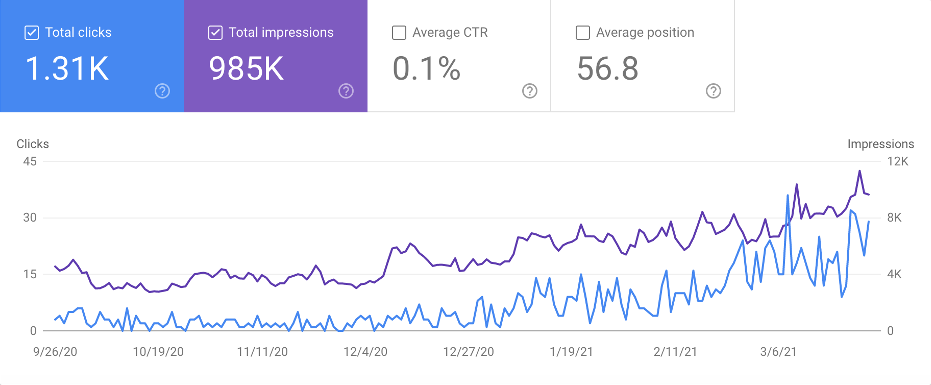
Google Search Console is a free tool provided by Google that offers valuable insights into your website’s presence on Google Search. Here’s how you can use it to monitor organic rankings:
- Set Up Google Search Console: If you haven’t already, start by setting up your website in Google Search Console. It’s a straightforward process that involves verifying ownership of your site by adding a snippet of code or using Google Analytics.
- Monitor Search Analytics: Once your site is verified, navigate to the “Performance” page, where you can view data on the keywords that drive organic traffic to your site, as well as metrics like clicks, impressions, click-through rate (CTR), and average position.
- Identify Click-Through Opportunities: Google Search Console also provides information about the average CTR for your keywords. If you notice a high impression count but a low CTR for a particular keyword, it’s an opportunity to improve your meta descriptions and titles to make them more enticing to users.
- Monitor Indexing Issues: Keep an eye on the “Pages” page within Google Search Console to identify and resolve any indexing issues that may affect your rankings. Addressing these issues promptly can help improve your organic search performance.
Google My Business (for Local Businesses)
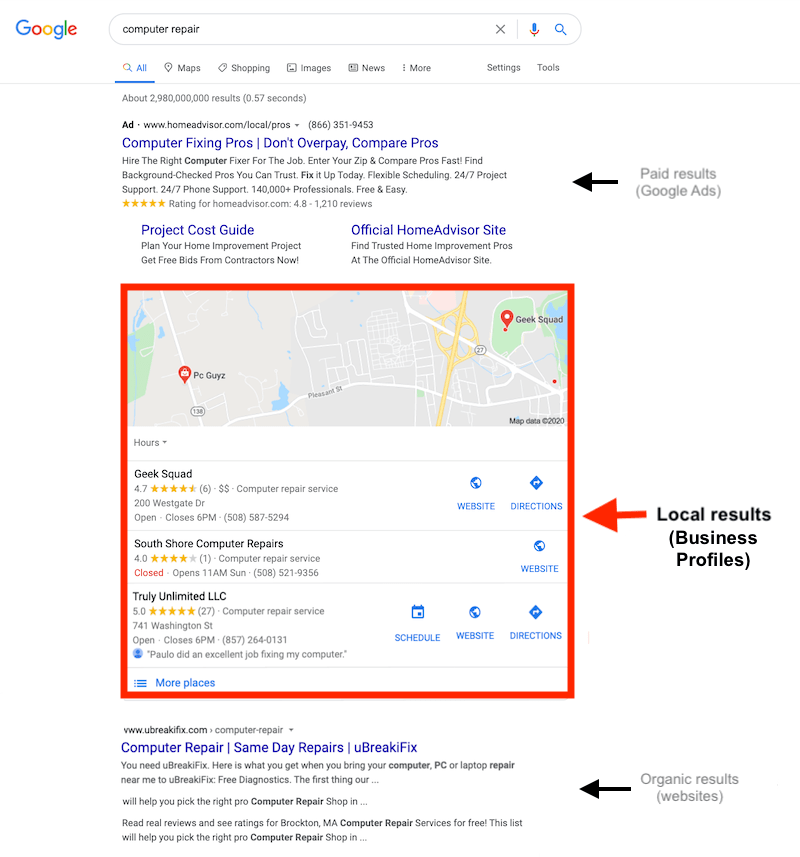
If you run a local business with a physical location, optimizing your Google My Business (GMB) profile is essential for local SEO. GMB not only helps you manage your business’s online presence but also provides insights into your local organic rankings:
- Claim and Optimize Your GMB Listing: Start by claiming and verifying your GMB listing. Ensure that all your business information, such as name, address, phone number, website, and hours of operation, is accurate and up-to-date. This optimization helps Google display your business in local search results, improving your visibility.
- Monitor Local Search Performance: GMB offers insights about how users find your business on Google, including the number of clicks, calls, and website visits generated from your listing. It also shows your business’s appearance in local searches and on Google Maps. Monitoring these metrics can help you gauge your local organic rankings and make adjustments as needed.
- Collect and Respond to Reviews: Customer reviews play a significant role in local SEO and user trust. Encourage your customers to leave reviews on your GMB listing, and be proactive in responding to both positive and negative reviews. Positive reviews can boost your local rankings, while addressing concerns shows your commitment to customer satisfaction.
- Post Regular Updates: Google allows you to post updates, events, and offers on your GMB listing. Posting regularly can help keep your listing fresh and engaging. It’s an excellent way to inform potential customers about promotions, events, or new products/services.
- Use Google Posts: Google Posts are short messages or updates that appear in your GMB listing. They can include text, images, and even call-to-action buttons. Posting relevant content through Google Posts can enhance your local visibility and encourage user engagement.
SEMrush

SEMrush is a comprehensive SEO and digital marketing tool that offers a wide range of features for tracking organic rankings and gaining valuable insights. Here’s how you can leverage SEMrush to monitor your website’s performance effectively:
- Set Up Your Project: Create a project in SEMrush by entering your website’s domain and selecting the search engines and locations you want to track.
- Add Your Keywords: Add the list of keywords you want to monitor. SEMrush will regularly check your website’s rankings for these keywords and provide historical data.
- Track Competitors: You can also track your competitors’ rankings for the same keywords, gaining insights into their SEO strategies.
- Receive Alerts: SEMrush provides email alerts when there are significant changes in your rankings, helping you stay informed about important developments.
- Analyze Keyword Trends: SEMrush’s tool offers in-depth analysis of keyword trends, including position changes, search volume, and competitive density. This data can guide your content and optimization efforts.
- Generate Reports: SEMrush allows you to generate detailed reports that showcase your organic ranking performance, making it easy to share insights with your team or clients.
Ahrefs

Ahrefs is another powerful SEO tool that offers a suite of features for tracking organic rankings, analyzing backlinks, and conducting comprehensive website audits. Here’s how you can use Ahrefs to monitor your website’s performance:
- Create a Project: Start by creating a project in Ahrefs and entering your website’s domain.
- Add Keywords: Add the keywords you want to track. Ahrefs will provide you with detailed data on keyword rankings, search volume, and more.
- Track Competitors: Similar to SEMrush, Ahrefs allows you to track your competitors’ rankings for the same keywords. This information can help you identify opportunities and gaps in your SEO strategy.
- Visualize Ranking Changes: Ahrefs provides visual graphs and charts that showcase your website’s ranking changes over time, making it easy to spot trends and improvements.
- Receive Alerts: Set up email alerts to get notified when there are significant changes in your rankings or when you lose or gain backlinks.
SEOptimer’s Keyword Ranking Tool
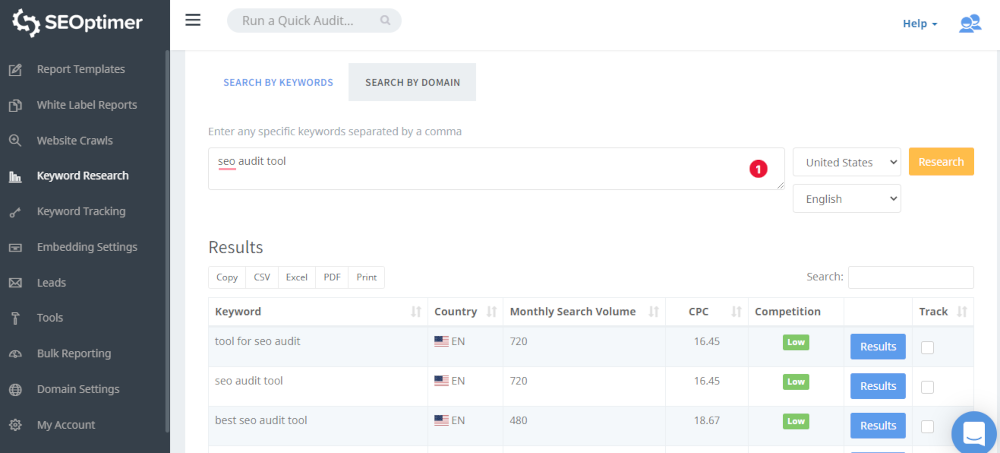
SEOptimer‘s Keyword Ranking Tool is a user-friendly tool that allows you to track your website’s keyword rankings effortlessly. Here’s how you can use it:
- Enter Your Website and Keywords: Start by entering your website URL and the keywords you want to track. SEOptimer will analyze your website’s rankings for those keywords across different search engines.
- Monitor Rankings Over Time: SEOptimer provides historical data on your keyword rankings, allowing you to see how they’ve changed over time. You can track improvements or declines in your rankings, enabling you to refine your SEO strategy.
- Compare with Competitors: SEOptimer also allows you to compare your website’s rankings with those of your competitors. This competitive analysis can provide valuable insights into your industry and help you identify areas for improvement.
- Receive Alerts and Notifications: Set up alerts within SEOptimer to receive notifications when there are significant changes in your keyword rankings. This proactive approach ensures that you’re always aware of fluctuations that may require your attention.
- Generate Reports: SEOptimer enables you to generate detailed reports on your keyword rankings and share them with your team or clients. These reports provide a clear overview of your SEO progress.
Third-Party Analytics Integration
While Google Analytics provides comprehensive data about your website’s performance, integrating third-party analytics tools can enhance your insights into organic rankings. Here’s how to do it:
- Choose a Third-Party Tool: Select a reputable third-party analytics tool that specializes in SEO tracking, such as Moz or SEMrush. These tools offer advanced features and in-depth analysis of your organic rankings.
- Set Up Integration: Connect your chosen tool to your Google Analytics account. Most third-party tools provide step-by-step instructions on how to set up the integration. Once connected, you can access additional SEO metrics and reports.
- Analyze Organic Ranking Data: With the integration in place, you can delve into more detailed organic ranking data. These tools often offer keyword research, competitor analysis, and recommendations to improve your rankings.
- Track Backlinks and Competitors: Many third-party tools provide insights into your backlink profile and competitor backlinks. Monitoring these aspects can help you identify link-building opportunities and stay ahead of your competition.
- Receive Custom Recommendations: Third-party SEO tools often generate custom recommendations to improve your organic rankings. These recommendations may include on-page optimizations, content suggestions, and technical SEO enhancements.
Free Keyword Tracking Tools
If you’re on a tight budget, there are free keyword tracking tools available that can provide basic insights into your organic rankings. One such tool is “Keyword Rank Checker.” Here’s how to use it:
- Enter Your Website and Keywords: Visit a free keyword tracking tool like “Keyword Rank Checker” and enter your website URL and the keywords you want to track. The tool will scan search engine results and display your website’s current rankings for those keywords.
- Monitor Changes: Regularly check your keyword rankings using the free tool. While it may not offer the same depth of analysis as premium tools, it can still help you stay informed about your website’s performance in search results.
- Identify Trends: Although free tools may not provide historical data, you can still identify trends by periodically tracking your keyword rankings. If you notice consistent improvements or declines, it’s an indication of the effectiveness of your SEO efforts.
- Supplement with Other Free Tools: Combine the use of free keyword tracking tools with other free SEO tools like Google Analytics and Google Search Console to gain a comprehensive understanding of your organic rankings.
Conclusion
In conclusion, tracking your website’s organic rankings is an essential part of any successful SEO strategy. By utilizing tools like Google Search Console, Google My Business, SEMrush, Ahrefs, SEOptimer, third-party analytics integration, and free keyword tracking tools, you can gain valuable insights into your website’s performance in search engine results.
These methods allow you to monitor keyword performance, assess local SEO efforts, analyze rankings over time, and receive actionable recommendations. Whether you have a small budget or access to premium tools, there are options available to suit your needs.
Stay committed to regular monitoring, adapt your SEO strategy based on insights, and continue striving for improved organic search rankings. With these methods in your toolkit, you’re well-equipped to make data-driven decisions and enhance your website’s visibility in search engine results.
In the final part of this article, we’ll provide additional insights and tips to help you make the most of your organic ranking monitoring efforts. We’ll explore best practices for interpreting data, optimizing content, and staying ahead of SEO trends.